
T-Link Version too old for Monitor Firmware
When you connect to a monitor with T-Link you get this:
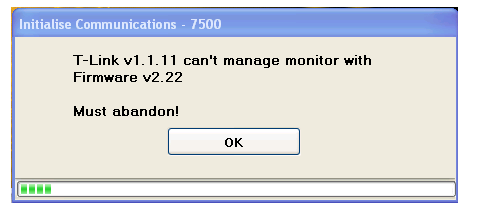
Then it throws you back to the T-Link Main Window!
The monitor number will be different, and T-Link and Firmware version numbers may be too
What is happening?
When T-Link connects to a monitor it checks many things about the monitor before it connects
completely. One of the first things is the Firmware Version.
If the firmware version is released AFTER the T-Link version, it is likely that it will have features that the T-Link
version does not understand. T-Link must reject the monitor or it may corrupt the data or the settings!
What can I do?
You must update your T-Link version to the latest version (or at least to one that is later than the Firmware
version)!
This will normally occur when you return your monitor for repair and/or calibration, and Texcel updates
the firmware.
Or contact Texcel
And we will send you a link, from which you can download the install package for the latest version.
Email: team@texcel.com.au
Further Assistance
If you need any further assistance, please contact Texcel:
Phone: +61-7-3237 8111
Email: team@texcel.com.au