
How to use the Texcel Triaxial Accelerometer with T -Link
Texcel Triaxial Accelerometer Types
The Texcel Triaxial Accelerometer comes as two separate products:
- Triax ACC L with a high sensitivity for measuring low levels of acceleration
- Triax ACC H with a lower sensitivity for measuring high levels of acceleration
Internally they are both based on a high-quality PCB ICP accelerometer.
The Sensor in T-Link Custom Settings
The monitor with either Triax ACC L or Triax ACC H is delivered with two sensors in the Factory Calibration, and appears in the settings as two sensors, measuring acceleration in m/s2 or g.
For the Triax ACC L:
- Triax ACC LM measures acceleration in m/s2
- Triax ACC LG measures acceleration in g
Note: The monitor will usually be delivered measuring acceleration in m/s2.
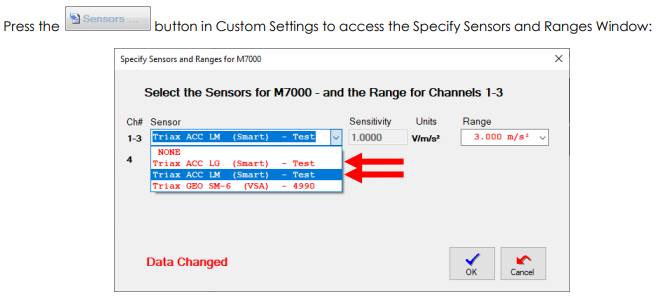
The two types of Triaxial Accelerometer Sensor shown use the same sensor with two different sensitivities to cater for the two different units.
Similarly, for the Triax ACC H they will be:
- Triax ACC HM measures acceleration in m/s2
- Triax ACC HG measures acceleration in g
Texcel Triaxial Accelerometer Operation
These are wide bandwidth accelerometers where the bandwidth is set by the sample rate in the monitor’s settings – they have these features:
- Results are in units of m/s2 or g
- Sensor is omni-directional and can be mounted in any orientation
- Bandwidth from 0.4 Hz to 30 % of the sample rate in the settings in your ETM (or GTM)
- 4 Range Selections are available in the settings
Ranges for the available Sensors:
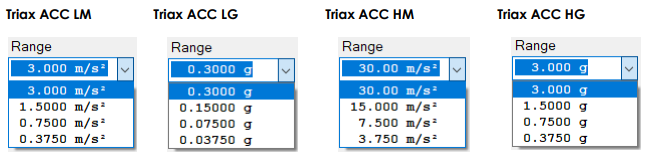
Note: actual ranges will vary slightly from the nominal ranges shown due to calibrated sensitivities.
Note: For full specifications request the Texcel Accelerometers Technical Summary.
Note on Use with invalid settings
If you have a settings with a Triaxial Accelerometer selected in your ETM (or GTM), and do not have the Triaxial Accelerometer selected, the results will be invalid:
- When you go Duty, the ETM (or GTM) will give an extended beep and display

- It will record the fact that an invalid sensor was used in the History LOG
History extract showing Smart Sensor Error:

Further Assistance
If you need any further assistance, please contact Texcel:
Phone: +61-7-3237 8111
Email: team@texcel.com.au